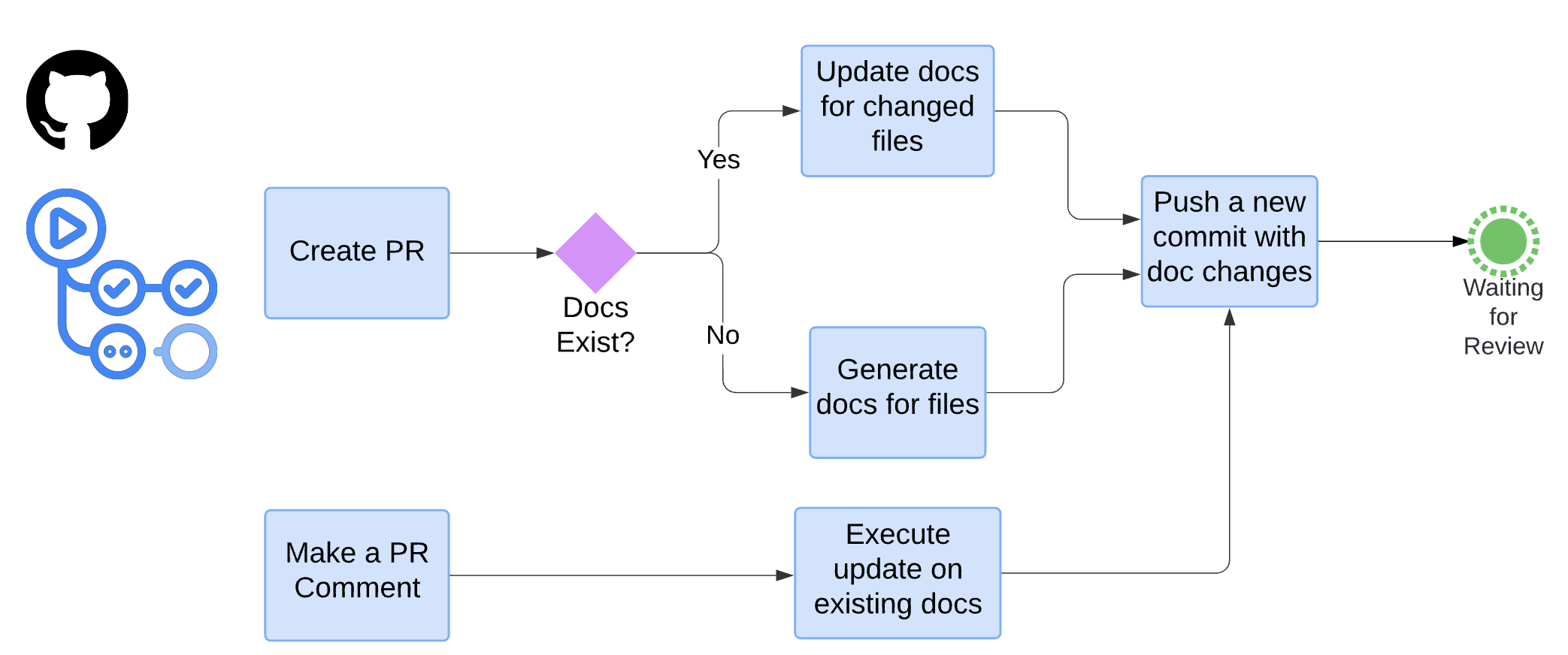
Once a pull request (PR) is created, the predefined workflow will be triggered. If the changed file already has documentation, we just update it. If documentation does not exist, we generate one. Then a new commit containing the doc changes will be pushed to that PR. Additionally, the developer can also provide update instructions by making a PR comment. DocAider will process that comment and execute the update instructions.
Updating the Documentation
Recursive Update
To maintain consistency and accuracy across all related documentation when a class/function in a file is changed, the Documentation Update feature performs the update recursively. If a class/function is modified, the system will automatically update the documentation for all dependent files. This includes the documentation of source files that use the changed class/function, as well as the documentation of files that use functions depending on the changed class/function. This recursive updating ensures that all related documentation remains up-to-date with the latest changes in the code.
Recursive Update

We create a function relationship graph for performing recursive update. This is a simple example. There are four source files in the repo, main.py, user.py, utils.py, and data_processor.py. The arrows show the dependency relationship of functions. Recursive update happens when a function is changed, the documentation of its caller files will be changed, too.
Documentation Update on PR Comment
Documentation update on PR Comment allows reviewers to trigger the documentation updates on specified files by making a comment in a certain format. The reviewer can specify which file needs an update and provide instructions on what changes should be made. The system will then process this comment and update the documentation as instructed. This feature ensures that precise and targeted documentation updates can be made based on reviewer feedback, improving the overall quality and relevance of the documentation. Furthermore, it removes the need for developers to manually change documentation according to reviewers' comments. To use this feature, a template needs to be used, which is as follows:
- File_Path: Relative file path to the root folder. For example, if the documentation for a source file is root_folder/utils/utils.py, the file path needs to be utils/utils.py
- Comment: The comment should address the issue and what needs to be changed in the specified file documentation. An important thing to note is when using PR comments to update documentation, users need to provide precise instructions, as LLMs might be confused if the comments are vague or inaccurate.
